9.1.2015 – Finally got things setup on GitHub after Google Code decided to shut down.
https://github.com/jamesedgejr/projectrf
3.12.2014 – Moved upkeep of this project to Google Code as people have asked to assist with the project. Also you will be able to get the latest code as I make changes which is all the time. Email me at projectrf (at) jedge.com if you want to be included as a submitter to this project or have bugs to report.
Project Page (https://code.google.com/p/projectrf/)
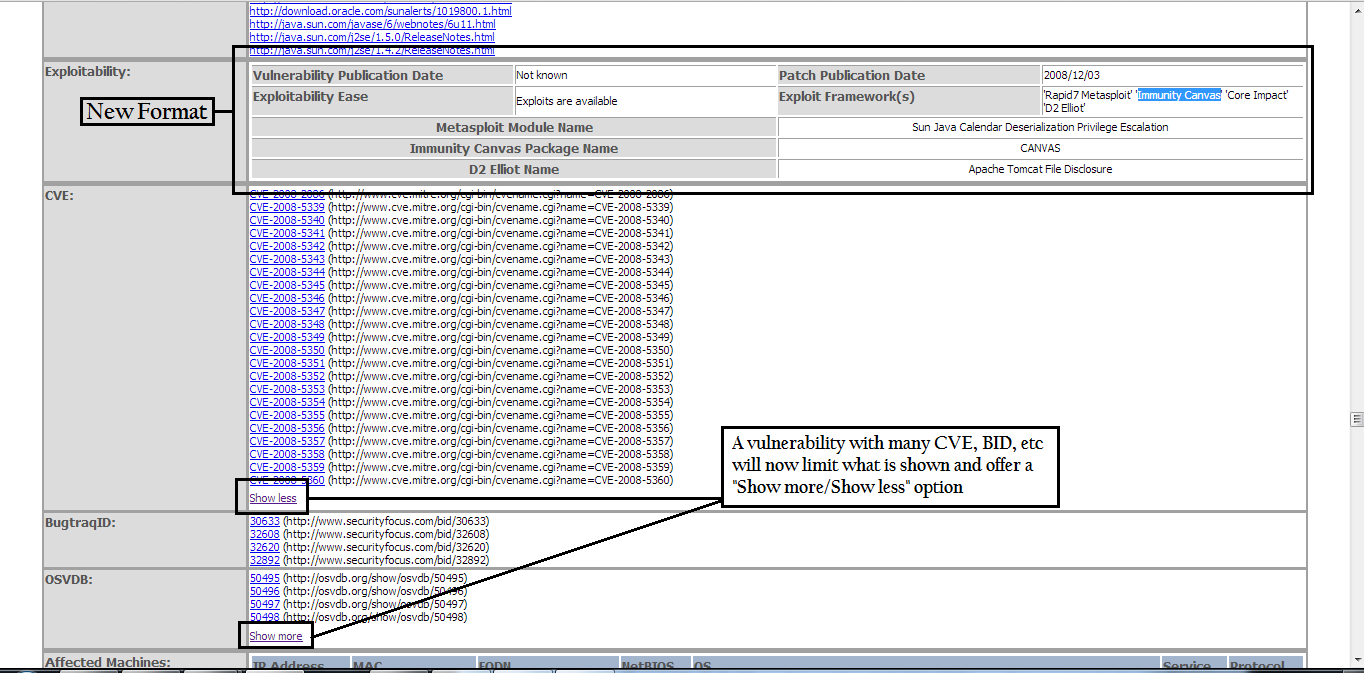
12.11.2013 – So Tenable has made a bunch of changes and additions to the XML (.nessus) file and I’ve tried my best to incorporate them into the project. First off they did something awesome which is alphabetize the XML elements. So I’ve done that as well in the Nessus parse and report scripts. It makes it so much easier to manage. So with new elements comes new table columns. If using this code base you should know that you need to clear all data from the DB. I’ve made some changes to the report as shown in the graphic below.
9.12.2013 – So I use this tool all the time to parse Nessus and Nmap scripts and it is nice to see other people doing the same. Feel free to email me at projectrf@jedge.com with any things you would like to see or issues you come across. I forget all the changes I made but a list of what I remember is listed below. Latest code is here.
3.6.2013 So Nessus 5 is pretty cool for being able to filter the results to generate reports. I still like my reports though, especially the vulnerability matrix. I also like creating the quick Nmap CSV files as well as loading Kismet into a database to run queries (no reporting yet). I also added an import for Dumpsec and so far have a simple report that tells me password age.
I created Project RF to have a reporting framework that provides consistent reports for various vulnerability scanning tools. The project started with support for Nessus, Eeye Retina, and Nmap expanded with reporting for HP WebInpect, AppScan AppDetective, Kismet, and GFI Languard. This project is still in its alpha stages as I’m not a top notch web program developer. Scan results are exported to XML which is then uploaded, parsed, and imported into a backend MySQL database. I have found this framework very useful in generating reports for my workpapers.
I have created an updated and stripped down version of the framework for the latest Nessus XML. All the work was done redoing the Nessus support for the updated XML with additional reporting features. I’ve created this document (http://www.jedge.com/docs/install%20Project%20RF.pdf) to assist in setting up the framework. As time permits I will include import options for XML reports generated from WebInspect, AppDetective, Nmap, & Kismet. The current parse code I have does not support the latest XML for those tools.
12.11.2013 code can be found here. (http://www.jedge.com/docs/projectRF.12.11.2013.zip)
9.12.2013 code can be found here. (http://www.jedge.com/docs/projectRF.9.12.2013.zip)
Old Old code can be found here (http://www.jedge.com/docs/projectRF.tar.gz).
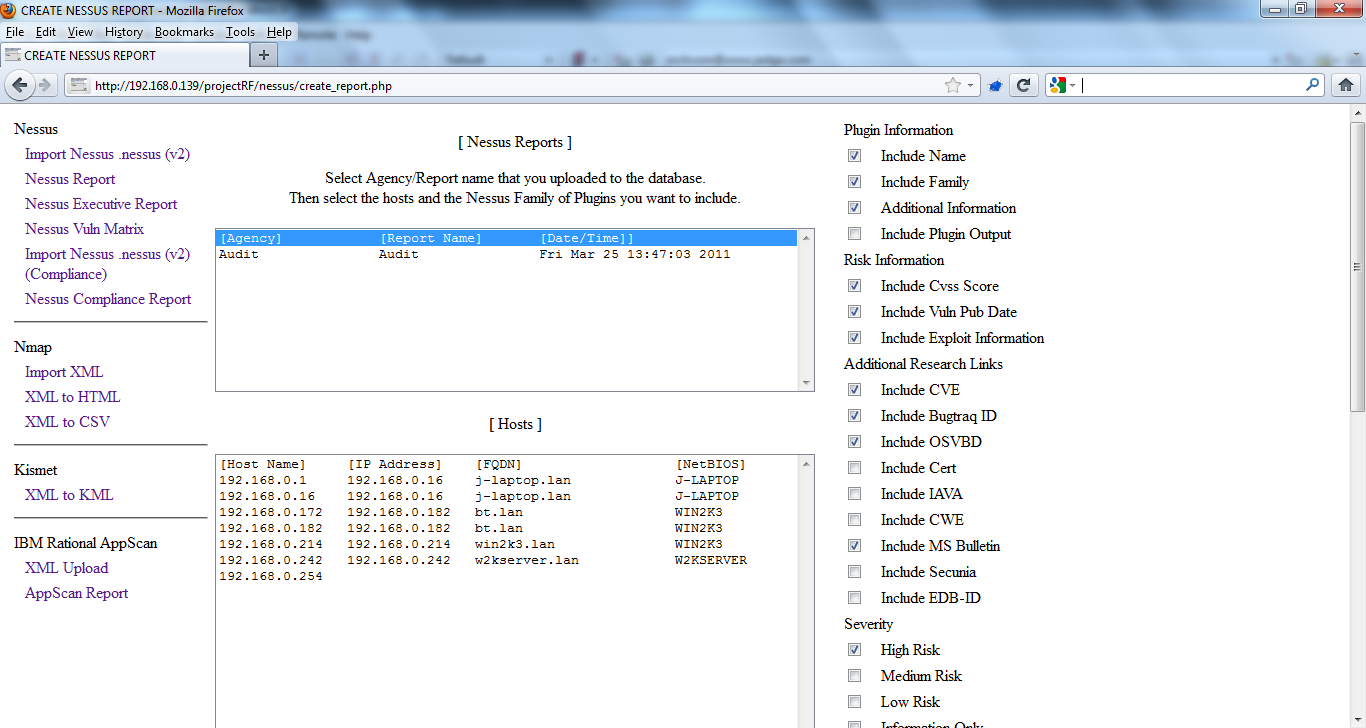
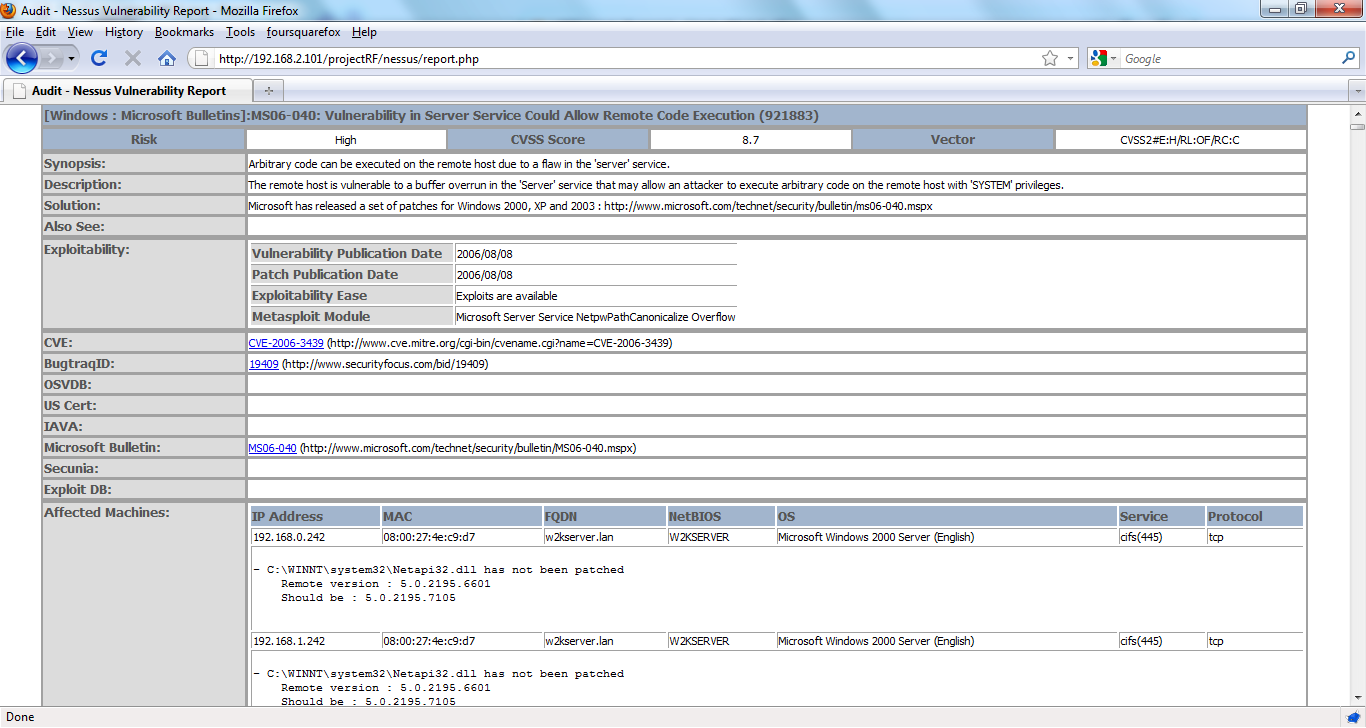
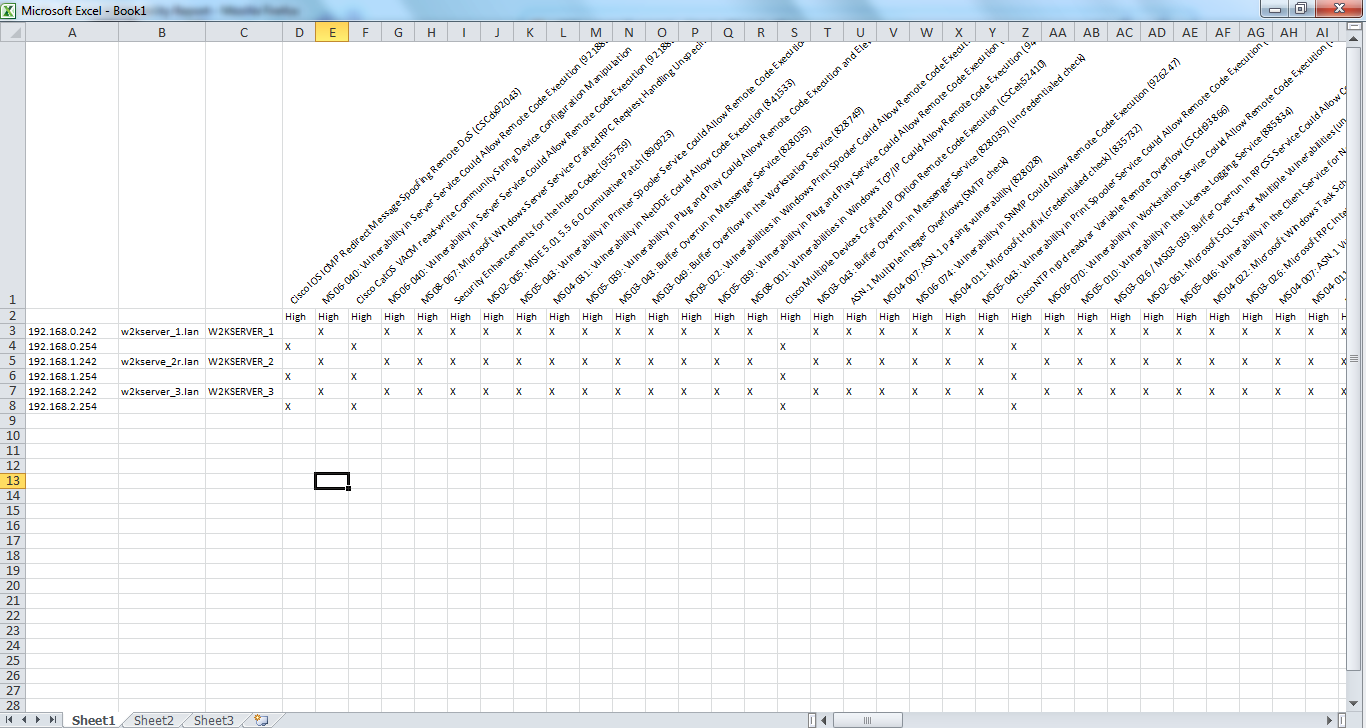
- Nessus Vulnerability Matrix
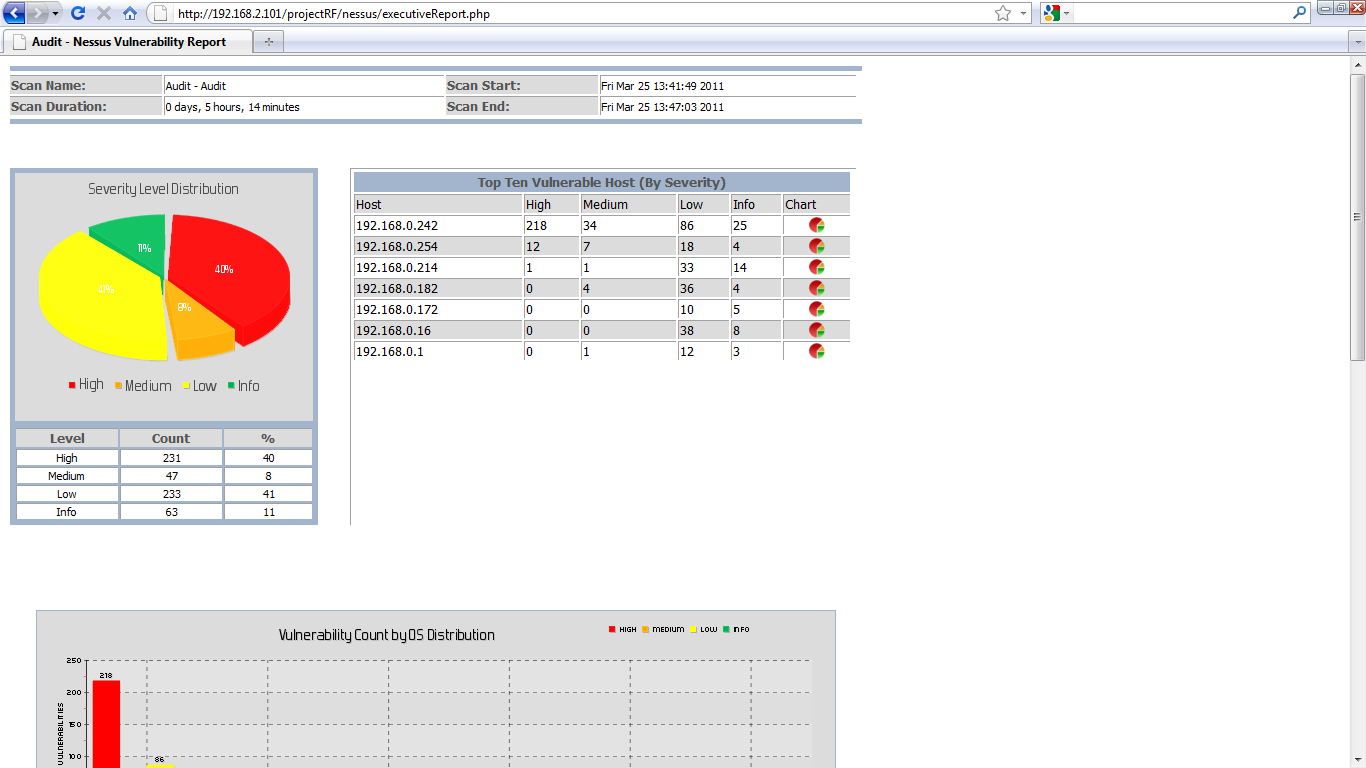
Change Log
12.11.2013 – I made the exploit table even less crappy and included the new XML elements around core, canvas, and d2 elliot frameworks. I added “Show more/Show less” options for the vulnerability site indexes (CVE, BID, etc) I noticed that listing them all out can create one long report and who really needs to have the links for all 30 CVEs around java anyway 🙂 Lastly I include any JS and CSS in the HTML instead of linking to a file. This makes one neat file/report when you save the HTML as a file in any browser. No more stupid folder with all the “files”. I’ve also made some changes to the Executive report. You now have an option to report on Nessus Plugin or CVE total. Look for BID, OSVDB, etc in the near future.
Oh, and lastly…the Nessus Vuln Matrix is broken as I need to update the code to reflect all the changes. It mostly centers around the CVSS field breaking out into four elements.
9.12.2013 – Nessus: Someone pointed out that there was no option to have the Solution show up in the report (fixed). There have been changes to the database fields. Some fields were to small and data was getting truncated. Made the Exploit table look pretty (or not as crappy). See Also actually creates the links properly.
Nmap: There is a CSV you can create that combines results from Nessus and Nmap. Nmap is better at service detection and Nessus is better at OS detection.
3.6.2013 – I still work on this shit. Especially since I’m a full time pen tester again and create scripts for reporting.
7.12.2011 – Redid the Nessus compliance parser so it actually works. It was tested on an audit file created by the i2a tool. The report created is still crude but you can dump the info to CSV for analysis.
7.4.2011 – When the Nessus reports are parsed I calculate the scan start and end time and include that in the nessus_results table. Why the Nessus XML files does not have this I don’t know. This is now used to make each scan unique and I hope to include reporting that shows progress on patching vulnerabilities. We shall see.






The idea looks cool, would definitely like to try it out for some time and maybe if possible help in development although i am already handful with task’s.
If possible do share the code with me.
I hope my presentation would help you in understanding the dot nessus v2 format.
Also do check tennable official documentation its now updated for v2.
Anant,
Here is the link (http://www.jedge.com/docs/projectRF.zip) to the code. A PDF on how to get the LAMP framework up and running is included in the ZIP file.
Are you still supporting this project? Several attempts to email you at projectRF email address have failed. If so, could you reach out to me at the email address provided?
Thanks!
Ryan
Ryan,
Still coding for the framework. I thought I had created the email account projectRF@jedge.com but apparently I did not. Thanks for pointing that out. It has been corrected.
Is this project still active? I have a specific nmap script and results needing to be parsed, output to csv, and input to a mysql database. Wondering if anyone is interested in doing some freelancing.
The short answer is yes it is still “active”. I haven’t had time to see how the new Nessus 5 makes this relevant or how the XML file has changed. Parsing Nmap to create a CSV or import into MySQL is not a problem at all.
Hi,
thank for jour job, projectRF is really userful.
Unfortunately I need to delete some report (and why not merge different ones).
Maybe these features will be avaiable in the next releases :).
In the meanwhile can I have the mysql query to delete all data related to one report uploaded?
Thanks in advance,
Andrea
hi,
this idea is very cool
actually m also working on the same project, i am also a full time pentester.
i want to work with you, please let me know if there any opportunity to work with you.
Thanks and Regards
suraj pratap
James,
I see you posted in March of this year (2013) and said you are still working on it. Is there an updated release or is what’s currently available the latest iteration?
Thanks,
DW
Very cool! Any chance on getting OpenVAS as well?
denden,
Email me at projectrf@jedge.com. I’d love to help with OpenVAS. I’ve looked into it in the past but I need sample output files. Preferably XML. Though this project originally started with Nessus 2.0 NBE files back in 2004 so as long as it can be parsed reports can be created.